
FM-CODEX: Transform AI Text into a FileMaker Script
Integrating artificial intelligence into FileMaker is moving at a fast pace, as you might have seen in Claris's latest video. Before this integration officially arrives, we "tweaked" a database to copy text into a FileMaker script.
Integrating AI into FileMaker
With the arrival of Claude Code, OpenAI's Codex, or even Cursor, software development is being revolutionized by AIs capable of writing code in any language.
Since FileMaker is a closed ecosystem, I looked for a solution to bridge the gap between AI-generated scripts and FileMaker.
By leveraging the clipboard and the BaseElements plugin, I created a FileMaker database that allows you to paste text from an AI and transform it into a native FileMaker script.
Screenshot
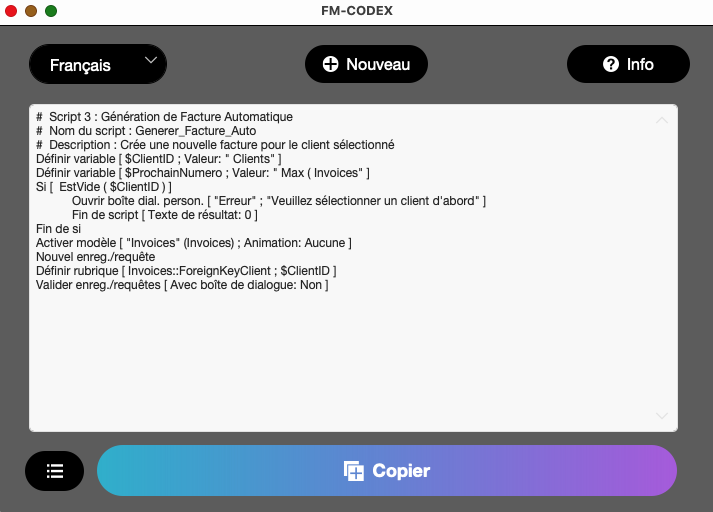
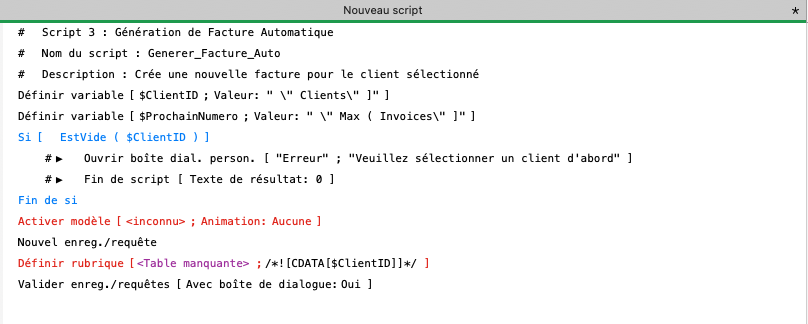
Features and Limitations
No more rebuilding scripts by hand
With this solution, the script is automatically generated inside FileMaker. You can find the AI-powered website developed for this application at this address : fm-codex.io
Line-by-line processing
To make it work, the system checks line by line if the script step exists in my script steps table, and then generates the equivalent XML code.
Heavy use of comments
Unfortunately, handling every single script step and its various options is highly complex. Therefore, I generate comment lines that start with ▶︎ for unsupported elements.
A helping hand before native FileMaker integration
Even though this application doesn't support every single script step, it provides a great workaround while we wait for native AI integration within FileMaker.